Clearing what a bucket stores but does not show
A bucket usually stores more than an ordinary listing shows, and every byte of it is charged at the same rate as the files you can see. Bucketree finds it, says where it is, and removes the parts you choose.
Open it from Storage or from the bucket itself: Clean Up.
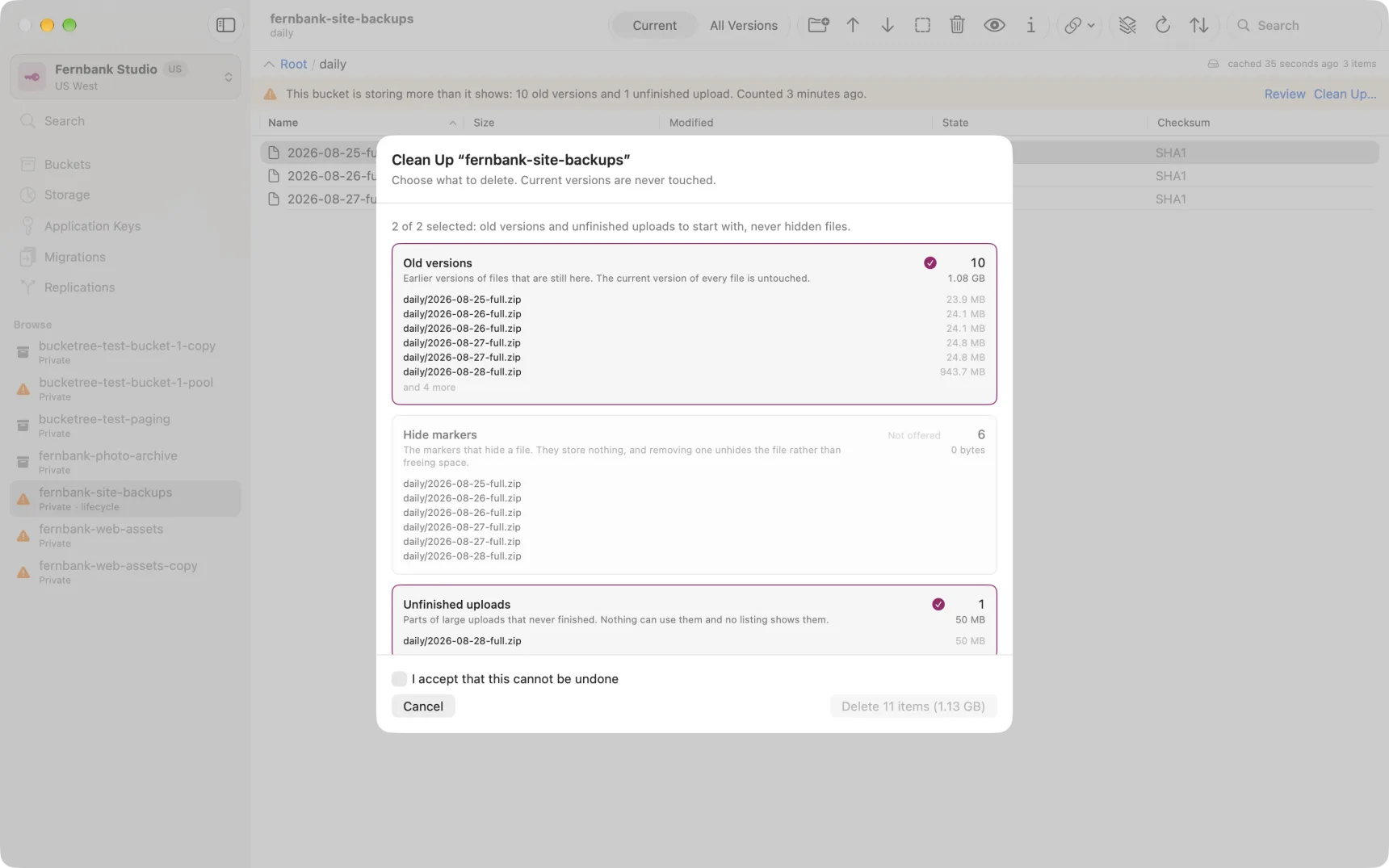
Four different things, and they do not cost the same to remove
The four are kept apart on purpose. A single button over the top of them would delete a file you meant to keep.
Old versions. Earlier versions of files that are still here. Removing them loses history. The current version of every file is untouched.
Hidden files. Every version of a file that is hidden. A hidden file is invisible in the ordinary listing and is still stored and still billed, and it can be brought back by unhiding it. Removing these ends that, so this group is never selected for you.
Hide markers. The markers that hide a file. They store nothing, and removing one unhides the file rather than freeing space, so Bucketree lists them and does not offer to delete them.
Unfinished uploads. Parts of large uploads that never completed. Nothing can use them, no listing shows them, and Backblaze keeps them indefinitely unless something clears them. There is no reason to keep any.
Choosing
Click a group to include it or leave it out. Old versions and unfinished uploads are included to start with; hidden files are not.
The button always says exactly what it will do, and the count changes as you click. If your selection includes hidden files it asks you to type the bucket's name first, because that is the one choice that removes a file somebody could otherwise get back.
While it runs
Cleaning a bucket with a lot of versions takes minutes. It does not hold you up: the pane closes and the work carries on, with its progress and a Stop on the bucket's row in Storage and on the banner in the bucket itself.
Doing it once, or keeping it clean
This clears what is there today. A bucket that keeps producing old versions will fill up again.
For that, a lifecycle rule is the better answer: Backblaze applies it on its own, for ever, without anyone coming back. Lifecycle rules and the two clocks explains how they work and the trap in them.